
£89.90
In a world where social media and the online world are ever-present, knowing how and when to introduce your kids to this new tech world can be a real struggle for parents. To help parents tackle this big milestone, is myFirst, a tech company focused on developing the world’s first tech ecosystem designed specifically for kids. Since 2017, myFirst has been developing devices and services which help kids navigate the early stages of the tech world, but in a safe and controlled way.
The newest launch from myFirst is the M1 Smartwatch, which has been specifically designed to be a wearable device option for kids that allows them to communicate and connect with their friends and family in a safe and monitored way. The M1 Smartwatch is designed for kids between the ages of 4 and 12 and provides an all-in-one smart device that enables kids to call and text with their contacts, listen to music, all whilst parents can track their activity and keep an eye on their location.
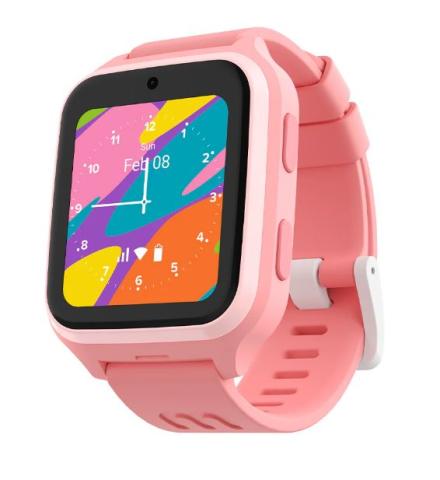
The watch features a large 1.6” AMOLED screen attached to a lightweight silicone strap. The M1 we got to test out came in a lovely pink colourway, but it also comes in a light blue option too! On the side of the screen display are two simple buttons for navigation and controls, with one to turn the watch and screen on and off, and the second used as a home button for the watch. However, the home button can also be used to send an SOS emergency alert to parents, along with a short voice message in emergency situations. This helps keep the controls of the device super kid-friendly and easy to use, whilst keeping safety and quick alerts at the forefront of its design.
For communication, the M1 Smartwatch comes with an included myFirst Free SIM, which provides the data connection to the watch, allowing it to send and receive messages. The SIM is super easy to set up and provides unlimited data for kids so they can stay connected to their family. The first month of SIM use is free; however, it does come with a subscription fee to keep the data connection. Thankfully, the monthly price isn’t too pricey at £8.99 a month, or £83.88 for the entire year (which works out to be about £6.99 a month). However, you can always use an existing SIM card and data plan if preferred.
Once connected, the smart watch can then be used for two-way communication via texts, calls and even video calls. However, communication is only available with the M1’s parental-managed contacts list. Parents can set the contacts the smartwatch can contact, ensuring that the only calls the watch can make and receive are from a pre-approved list. The watch has a 2MP HDR camera at the top, which allows for video calls via the watch, which is then supported by a powerful two-way microphone and an additional speaker. These help make the watch a useful communication tool.
However, to avoid the watch becoming a distraction, parents can set hours for the watch to be silent, whilst disabling all features except the SOS function. This is ideal for use whilst doing homework or whilst at school to avoid distractions. Then, for added safety, the watch provides parents with real-time GPS tracking, so they always know where their child is. As part of this, parents can set up Geo-Fencing alerts via the myFirst Circle app. These alerts show when your child is not within one of the established zones, e.g., home or school, so parents can have greater peace of mind that they always know where their child is.
The hub connecting parents and kids to the M1 Smartwatch is the myFirst Circle app. For parents, the app is where parental controls can be set, location tracked, and things like physical activity can be monitored throughout the day. For children, the myFirst Circle app is a great first entry point into the world of social media, allowing kids to connect with their family and friends, but in a controlled and monitored way.
The app is designed to protect kids from the unregulated nature of most social media platforms and ensures that their only contacts are preapproved for safety. This focus on controlled safety and communication is further exemplified by the inability to download third-party apps on the M1 Smartwatch. This ensures that only the regulated social platforms approved by myFirst are available, and everything else cannot be downloaded or accessed. This gives a great filtered version of the online world, without the influence of traditional social media sites.
Other cool features of the M1 Smartwatch include the ability to load songs and audiobooks onto the watch to listen to. The watch has a built-in speaker so kids can listen to their favourite songs or books on the go. However, the smartwatch can also be paired with myFirst’s headphones for wireless listening too!
Overall, the M1 Smartwatch is super impressive. It provides parents with a useful first step into the world of social media, whilst featuring a range of safety measures to give parents peace of mind. With many of us wearing our own smartwatches to stay connected throughout the day, the M1 Smartwatch provides the perfect child-friendly alternative.
Pros:
- Range of safety features for parents' peace of mind – no third-party apps downloaded, controlled contact list, location data, etc.
- Large screen and child-friendly navigation
- Lightweight silicone band for all day wearing
- Customisable face and interchangeable wrist strap for a personalised watch
Cons:
- The included SIM does add a monthly subscription to keep the smartwatch connected to data networks – but if paid in a yearly instalment, it’s not super expensive, plus you can use your own existing SIM card too
- Log in to post comments